

Workforce exposure
Employee Personal Data Exposure Checklist
Employee personal data exposure is not just a privacy issue. It is business attack context.
Most exposed details look harmless in isolation. The risk grows when attackers can connect a person's role, contact details, public profile, breach history, home address, or payment responsibility.
Published
Quick answer
Employee personal data exposure is when staff names, personal emails, mobile numbers, or home addresses appear on broker profiles, breach databases, or searchable public pages. It gives attackers the context they need for phishing, impersonation, and social engineering — without needing to hack anything. Start by checking what is already visible for your highest-risk staff.
Want this checked privately?
Hushfolk can review high-risk employee exposure without requiring staff data on the first call.
We document findings across data broker profiles, breach records, public identity signals, and role-linked exposure — and provide a structured reduction plan.
How exposure becomes risk
How employee data exposure becomes attack context
A single public detail is rarely the issue. The risk grows when multiple signals connect.
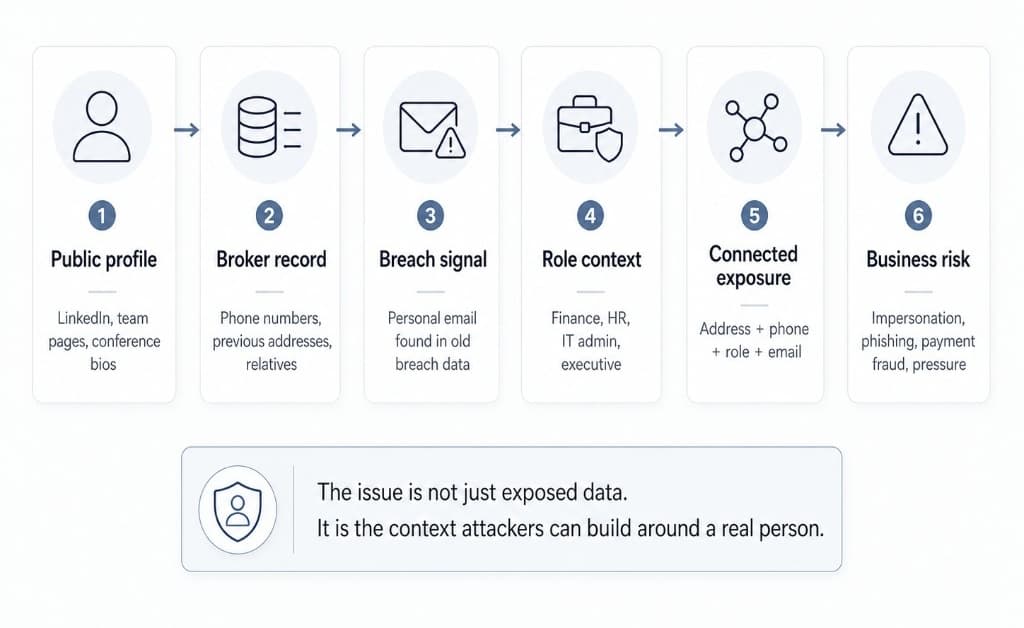
An employee's LinkedIn profile may be unremarkable. A broker record may be common. An old breach may feel historical. But when those signals connect to a finance, HR, IT, executive, or client-facing role — and an attacker can also see payment responsibility, a personal mobile, and a home address — the exposure becomes more useful than any single piece suggests.
The issue is not just exposed data. It is the context attackers can build around a real person — their role, their authority, their relationships, and how to reach them.
Where to start
Start with the roles attackers can use
Not all employee exposure carries the same business risk. The roles below represent the highest-value targets for social engineering, impersonation, and manipulation — because they combine public visibility with internal authority or access.
Finance / payments
Why it matters
Payment changes, invoices, approvals, and supplier messages. Finance staff are a primary target for impersonation and payment redirect fraud.
Check first
Personal email breaches, mobile numbers, home address exposure, LinkedIn profile with payment or approval context.
Executives / directors
Why it matters
Authority, urgency, public visibility. Executives are used to create impersonation pressure on staff below them.
Check first
Home address, family or household links, broker records, Companies House filings, public profiles, speaking bios.
HR / recruitment
Why it matters
Employee records, onboarding messages, sensitive internal communications. HR context helps attackers craft believable internal impersonation.
Check first
Personal email exposure, old public profiles, visible contact points, breach history, recruitment platform presence.
IT admins
Why it matters
Access permissions, reset requests, privileged accounts. IT staff are targeted for account takeover and social engineering into access grants.
Check first
Breached personal emails, aliases, old technical profiles, forum registrations, phone number exposure.
Client-facing staff
Why it matters
External trust, relationship-based impersonation, supplier and client pressure. Their public profiles make role context easy to confirm.
Check first
Public bios, social profiles, phone numbers, email patterns, event appearances, exposed role context.
In practice
What the exposure stack looks like in practice
What counts as employee personal data exposure?
Most security teams focus on the office. Firewall policies, endpoint management, access controls. Attackers often don't bother with any of that.
They start somewhere else. They search for your staff.
A personal mobile number on an old LinkedIn profile. A home address attached to a Companies House filing. A personal email that appeared in a breach three years ago. A broker profile linking someone's name to their family members and previous addresses.
None of this needs a sophisticated hack. It is the result of normal life — job changes, house moves, old account registrations — leaving traces that data brokers have been collecting quietly for years.
Exposure includes personal email addresses, mobile phone numbers, home and previous home addresses, relatives' names and contact details, aliases used online, breach records tied to personal accounts, and broker profiles that combine several of these into one searchable listing.
The risk is not any single piece. It is the combination. A phishing message becomes much harder to dismiss when it uses someone's nickname, references an old address, and arrives on a number they only ever gave to their bank.
The exposure stack attackers actually use
Here is a realistic scenario. An attacker wants to target your finance team.
They don't buy a breach dump. They spend 40 minutes on free tools.
First, they pull a LinkedIn profile: name, job title, tenure, and who else works there. Next, they run the name through a data broker. They find a current address, a previous address, a mobile number, and two associated email addresses. One of those emails appeared in a breach. That breach included a partial password.
Now they have enough to write a convincing phishing message. Or to impersonate a manager to a junior employee. Or to call the company pretending to be that person.
The Verizon Data Breach Investigations Report consistently shows that phishing and pretexting — using personal context to manipulate people — account for the majority of social engineering incidents. The data used in those attacks has to come from somewhere. Broker profiles are often where it starts.
Self-assessment
Run a 2-minute workforce exposure readiness check
This does not search for employee data and does not require staff names. It helps you understand whether your company has a basic process for finding and reducing employee-linked exposure.
If you cannot answer most of these, you do not have an exposure process yet.
That does not mean you are breached. It means attackers may have more employee context than your company is currently tracking.
Worked example
What a connected exposure record can look like
The goal is not to panic over a single public detail. The goal is to identify when multiple signals connect to a real employee and create business risk.
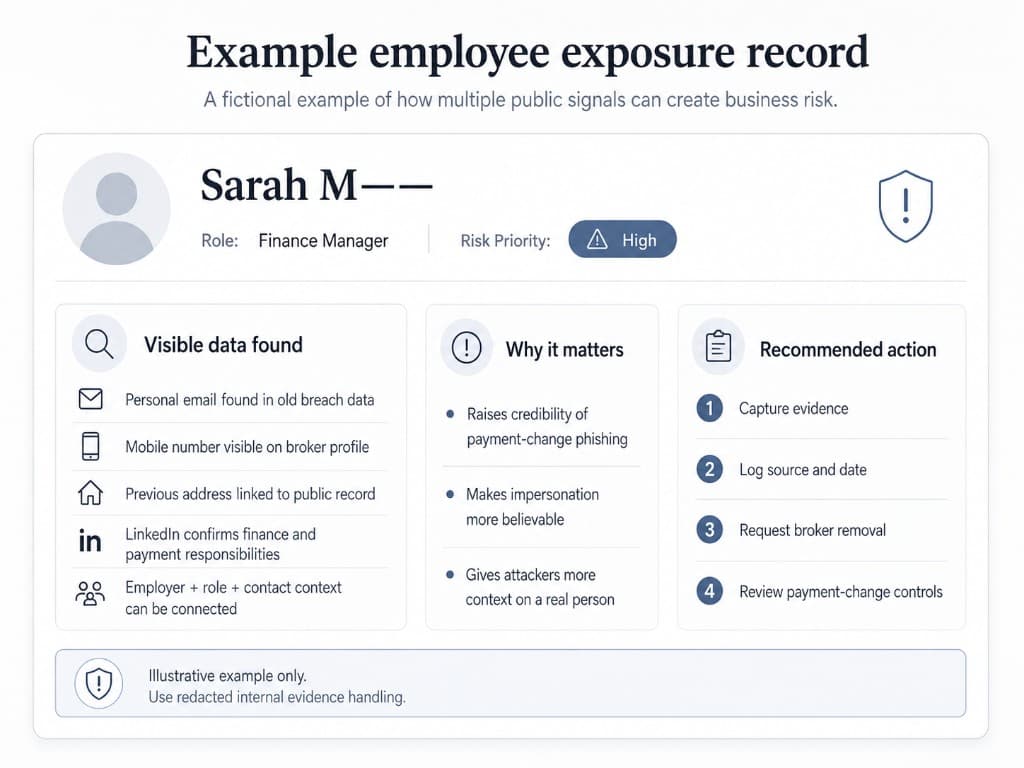
Use fictional or redacted records only when documenting examples internally. Do not circulate unnecessary employee personal data. This type of record exists to help teams understand what connected exposure looks like — not as a template for sharing real staff information.
The 10-minute public check
Start with your highest-risk staff: finance, executives, HR, IT administrators, and anyone with access to sensitive systems or an external-facing role.
For each person, check: what comes up when you search their full name in quotes; whether their name plus your company name surfaces any contact details; whether personal email addresses appear on breach check tools; whether data broker sites show address history, relatives, or phone numbers.
You're not building a full exposure map in ten minutes. You're checking whether the obvious data is sitting there waiting to be used.
If you find a broker profile that links a mobile number, a home address, and a previous address in one listing — that's a priority removal. Not because something bad has already happened. Because it gives an attacker more than they need to be convincing.
What HR and security teams should document
Most teams find exposure and then lose track of it.
They request removal from one broker. They don't record what they sent or when. A month later they're not sure whether the record came back. Six months after that someone gets phished — and no one knows whether the data was still visible when it happened.
A basic exposure log makes this manageable. For each employee, starting with high-risk roles, record: which site holds the data; what type of data is visible (address, phone, relatives, breach traces); the date you submitted a removal request and any confirmation reference; the expected response window; your next recheck date; and whether the record eventually returned.
A shared spreadsheet works fine for this. The point is that anyone on the team can open it and see what has been done — and what hasn't.
Risk priority
What should be prioritised first?
Not every exposed detail carries the same risk. Prioritise records that combine identity, contact details, role context, and potential business impact.
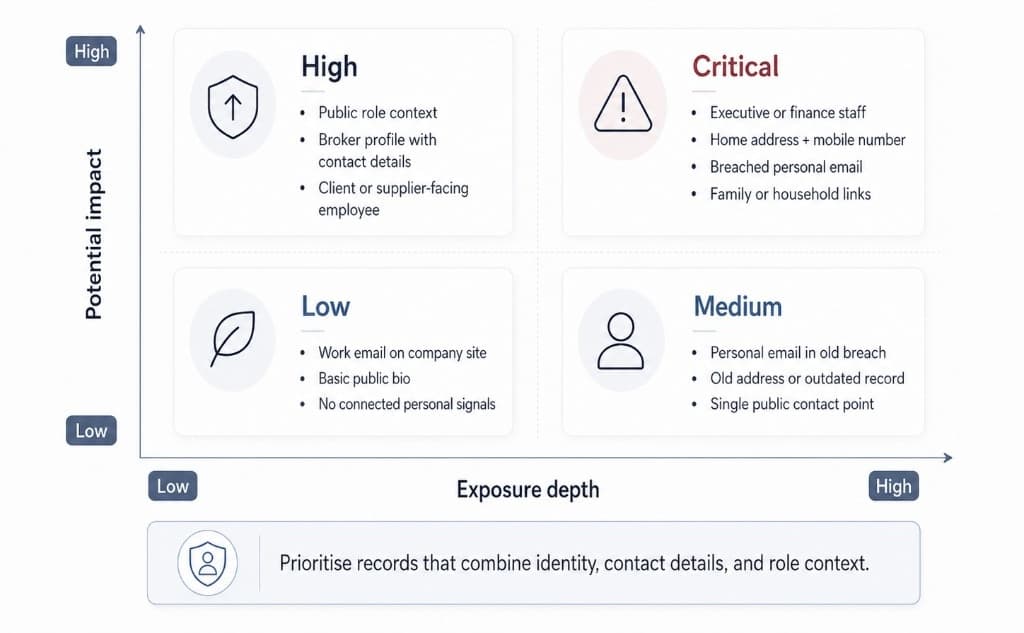
- LowBasic work email or public bio with no connected personal signals.
- MediumPersonal email breach, old address, or single public contact point.
- HighBroker profile with contact details connected to a visible business role.
- CriticalExecutive or finance role connected to home address, mobile number, personal email breach, or family or household links.
What to remove, restrict, or monitor first
Not everything needs the same urgency. Prioritise removal when a broker profile links a name to a mobile number and home address in the same listing, when a personal email is connected to a breach that exposed passwords or financial data, or when an executive or senior employee has a searchable home address.
Restrict where you can. Ask staff to review LinkedIn privacy settings for visible contact details. Remove personal email addresses from internal directories and email signatures where they aren't needed. Check whether any personal contact data appears on your own website.
Monitor on a schedule. Removed records come back more often than people expect — brokers refresh from upstream sources and partner datasets regularly. Recheck removed records monthly for the first three months. After that, a quarterly reminder for executive and high-risk staff data is enough.
Documentation
Document what you find before you act
A proper process needs more than searching. You need source notes, evidence dates, risk level, ownership, removal status, and recheck dates. Without this, findings get lost and removed records come back unnoticed.
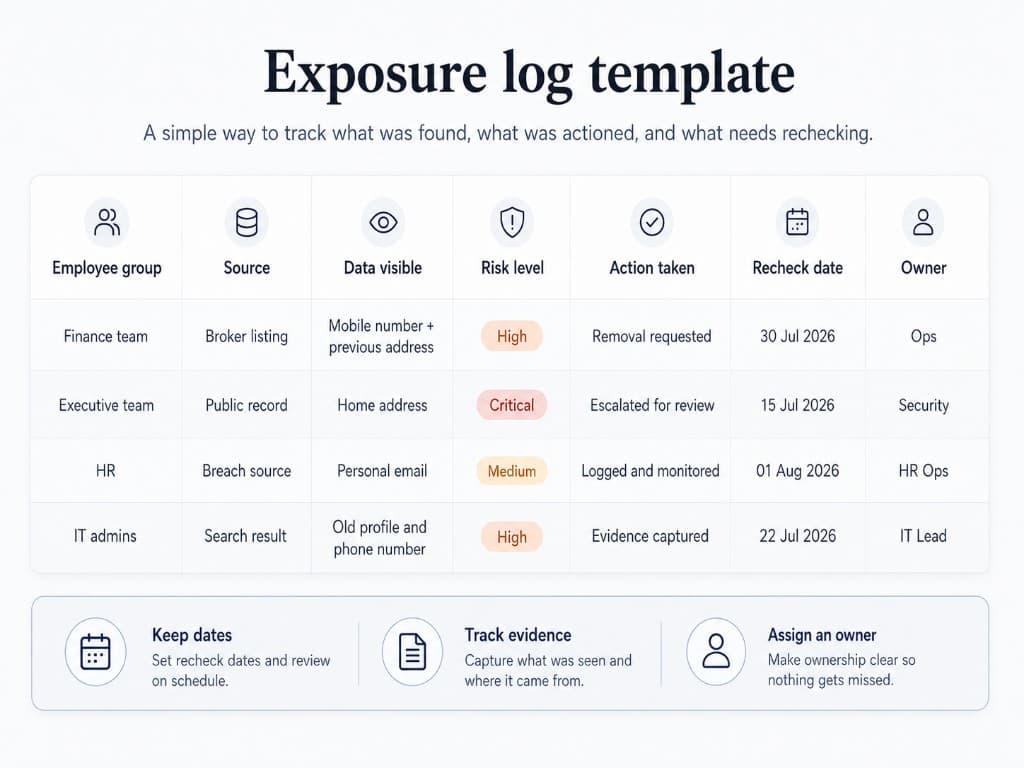
The worksheet records what was found, where it came from, what action was taken, who owns it, and when it needs checking again. A shared spreadsheet works fine — the point is that anyone on the team can open it and see what has been done, and what has not.
What good looks like
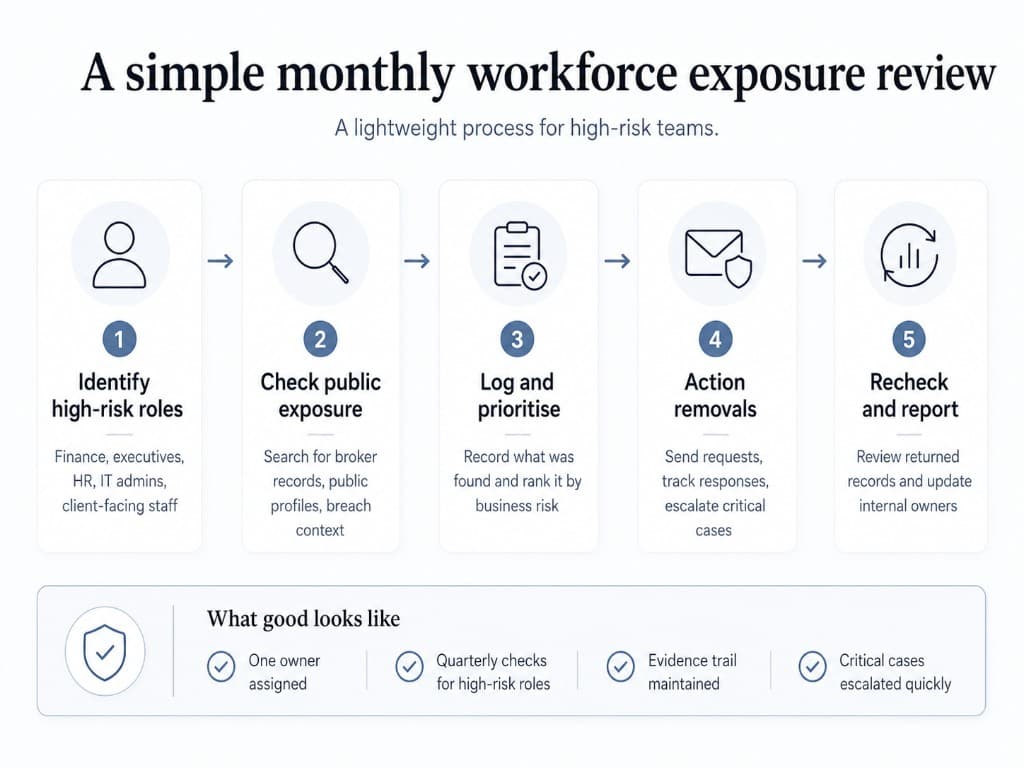
What good looks like — the monthly review
Employee exposure reduction is not a one-off cleanup. Broker records can return, job roles change, and new breach data appears. A lightweight review rhythm is safer than ad hoc searching.
The awkward truth about broker exposure is that it comes back.
A data partner reintroduces an old record. A removed profile reappears after a site update. A one-time cleanup is not the same as ongoing protection.
What works in practice: assign one person who owns the exposure log, even if it is only one hour a month. Run spot checks on two or three employees per month, rotating through the team. When someone joins or leaves, add a basic exposure check to your standard HR process. Keep the log updated so anyone can see which requests are pending and which are confirmed closed.
The goal isn't perfection. An hour a month, done consistently, is more effective than an intensive review once a year that nobody follows up on.
Checklist
Quick-start checklist
Use this as a starting point. The full 20-point worksheet is available below.
- Searched the full name of each high-risk employee in quotes to check for visible contact or address data
- Checked personal email addresses for high-risk staff against breach record databases
- Looked up names on at least two data broker sites for address history, phone numbers, and relatives
- Reviewed LinkedIn profiles for any visible mobile numbers or personal contact details
- Confirmed executives and senior managers do not have searchable home addresses on public broker sites
- Logged at least one broker removal request with the date, route used, and confirmation reference
- Identified who carries the highest visible exposure based on the initial check
- Reviewed whether any staff personal contact details appear on your own company website or directory
- Added a monthly exposure recheck reminder to the team calendar
- Confirmed someone owns the exposure log and knows when the next review is due
Free download
Get the full 20-point Employee Exposure Worksheet
The checklist above covers the basics. The full worksheet adds a prioritisation framework, a ready-to-use documentation template, and a quarterly review schedule your team can run in under an hour. No customisation needed.
Request the worksheetFrequently asked questions
Is employee personal data exposure the same as a data breach?
No. A data breach usually means a system was compromised and data was taken. Employee personal data exposure refers to data that is already visible in public sources — broker profiles, old registrations, past breach records — without any attack being required. Both create risk, but they need different responses.
Should companies scan employee personal data?
For roles carrying significant security risk — executives, finance, HR, IT administrators — checking what is publicly visible about staff is reasonable as part of a security assessment. You should have a clear policy for handling what you find, and be transparent with staff about what is being checked and why.
What data should be checked first?
Start with people who have access to financial systems, sensitive data, or external communications. Prioritise broker listings that link a name to a home address, mobile number, or personal email in the same record. Single data points carry lower risk than combinations.
How often should teams run these checks?
High-risk roles — finance, executives, HR, IT administrators — are worth checking quarterly. The rest of the team can be reviewed twice a year, with a recheck after significant changes like role changes, public-facing work, or departures.
Private workforce exposure audit
Turn this checklist into a reviewed exposure report
For businesses that want this handled properly, Hushfolk can run a private Workforce Exposure Intelligence Audit for executives, finance teams, HR, IT admins, or wider staff groups.